Second Light - Meade 127mm doublet

Andy Nowlen

Well-Known Member
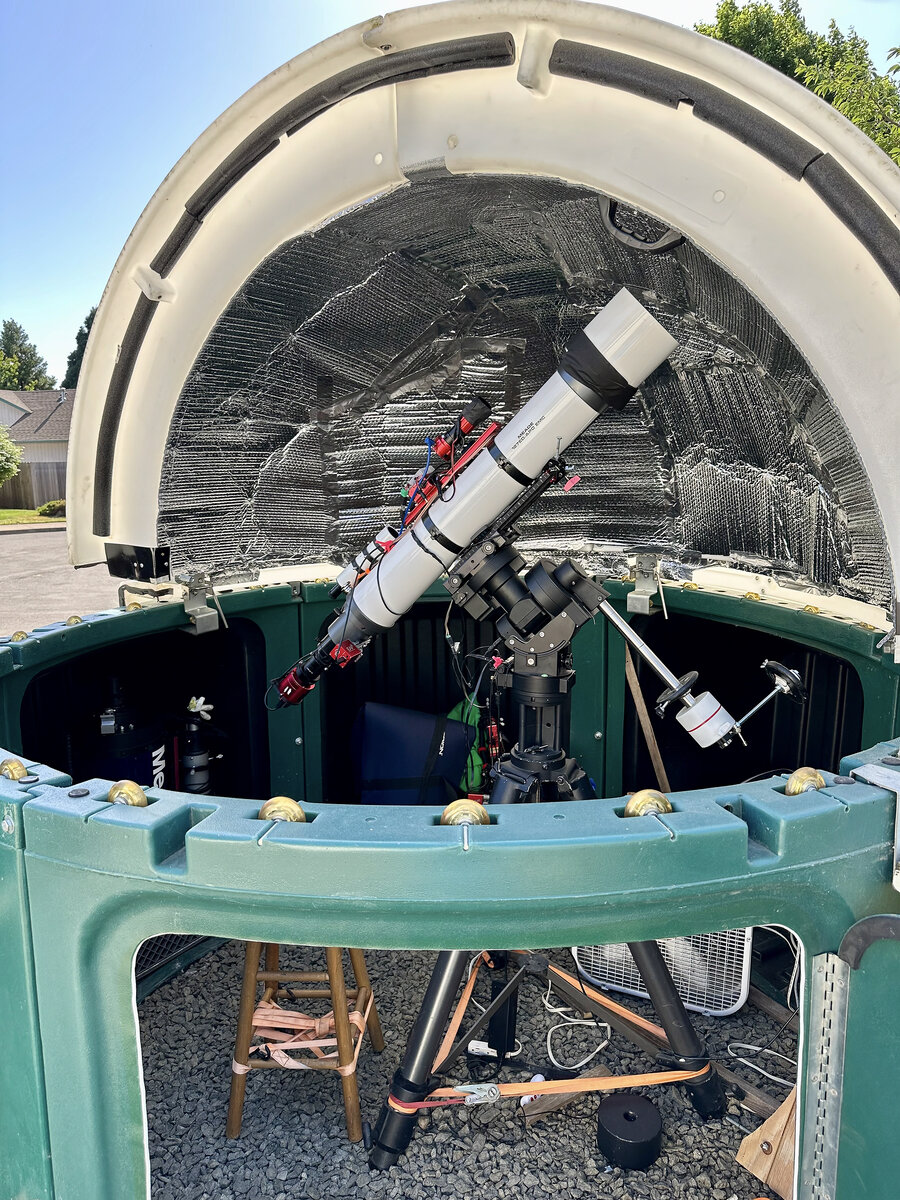
This image of NGC 7000 is a portion of the "Great Wall." This is my second attempt with this scope. The narrower field of view is new for me. There are definitely some aspects of post-processing that require attention. Color fringing is real. I tried a few approaches. I used Bill Blanshan's HOO normalization and then used all the tools I know. This is the first time I have worked with doublet images. I also included a 'straight-out-of-stack' image for comparison. I also included an image of the scope inside my observatory.

If you know any particular processing approaches for doublet images please let me know. I am still learning to deal with star fringing. But so far good enough. These four hours of integration were all I could get on June 1. I had about 72 180-second subframes. Maybe this weekend I can get some more time on target.

Overall, I am happy with this result. The moon was 2 days before full software managed that ok.

Meade 127mm @ 1144mm
Asi533mc pro
Triad Ultra Quad-band filter
AsiAir
ZWO EAF
Ioptron CEM70
Astropixel processor
Pixinsight
Photoshop
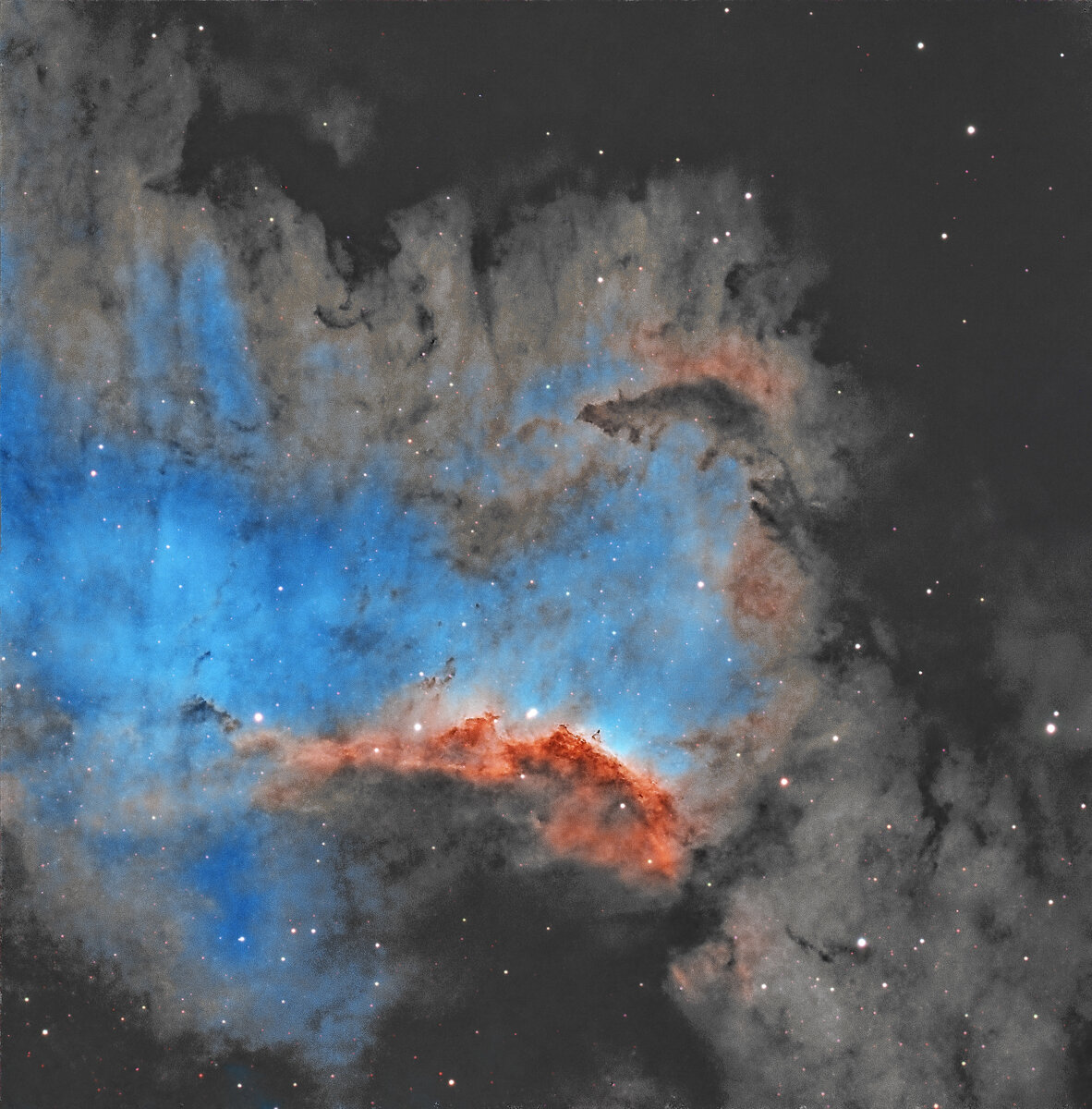

NGC 7000 HOO Great Wall 3000-2.jpg


NGC 7000 wall stack small.jpg


Meade 127 in observatory-2.jpg
 

JimFox

Moderator
Staff member
How sweet Andy! I want something longer, in that range but I think it's too long for my Gem28 to handle.

I think you did great. You don't have a flattener on it? I didn't see any issues with elongated stars in this.

As for the color fringing. I would do basic processing in Pixinsight, to the point of a simple stretch. Then save it as a tiff and take it into Photoshop and use the Camera Raw filter on it. You can remove color fringing pretty easy in it. Then you can take it back to Pixinsight and remove the stars, and do your other processing to finish it up.

I like your take on NGC 7000!
 

AlanLichty

Moderator
I will never complain about the weight of my 100-400mm lens again. That's a serious setup as your observatory.
 

Andy Nowlen

Well-Known Member
How sweet Andy! I want something longer, in that range but I think it's too long for my Gem28 to handle.

I think you did great. You don't have a flattener on it? I didn't see any issues with elongated stars in this.

As for the color fringing. I would do basic processing in Pixinsight, to the point of a simple stretch. Then save it as a tiff and take it into Photoshop and use the Camera Raw filter on it. You can remove color fringing pretty easy in it. Then you can take it back to Pixinsight and remove the stars, and do your other processing to finish it up.

I like your take on NGC 7000!
I think your photoshop advice is sound. I have not used a flattener. I have one that says it is for f7-f9. So I think it would work. I think the small 533mcp camera sensor probably avoids the bad stars. I will see what happens when I try the crop sensor 071mcp. That may require the flattener. I know a flattener reducer exists that would probably work. But for now I don’t want to loose any focal length.
Thanks!
 

Andy Nowlen

Well-Known Member
I will never complain about the weight of my 100-400mm lens again. That's a serious setup as your observatory.
everthing considered I am happy to add this scope experience to my knowledge base. Even if this scope is not permanently installed.

as we head back into having “bigger” nebulae available I’m interested to see more close up views of the targets I shot at 535 and 335 mm.
 

JimFox

Moderator
Staff member
I think your photoshop advice is sound. I have not used a flattener. I have one that says it is for f7-f9. So I think it would work. I think the small 533mcp camera sensor probably avoids the bad stars. I will see what happens when I try the crop sensor 071mcp. That may require the flattener. I know a flattener reducer exists that would probably work. But for now I don’t want to loose any focal length.
Thanks!
I totally get you on not wanting to lose any focal length. I dream of the day I can get up to 1000mm or higher. I am so desperate I am thinking on buy a 2x extender from Explore Scientific... it would turn my f4.9 into a f10. And I know there can be quality issues... but that's about all I can afford right now.

So I get you wanting to leave it on and get tighter shots of some of the nebulas.
 

Mike Lewis

Staff Member
Andy,

Looks wonderful to me and I would not have even recognized this as a doublet image having any star fringing unless you mentioned it, it is VERY subtle at least at this magnification and just not an issue.

If it is magenta fringing, and if you process your stars separately, and if you use PixInsight (lots of ifs) I have seen a cool trick that can work. If you invert an image with magenta in it the magenta turns green and then is easily removed with SCNR. Then you just invert the image back again. In fact I expect there are other green removal tools out there outside of PI that could work too. You might affect your star colors a little, but should not be much green in the stars either so I would say perhaps try it. It is a slick trick for magenta control, and you do have some knobs on SCNR to also control the amount of green you remove should you decide to play with that.

ML
 

Andy Nowlen

Well-Known Member
Andy,

Looks wonderful to me and I would not have even recognized this as a doublet image having any star fringing unless you mentioned it, it is VERY subtle at least at this magnification and just not an issue.

If it is magenta fringing, and if you process your stars separately, and if you use PixInsight (lots of ifs) I have seen a cool trick that can work. If you invert an image with magenta in it the magenta turns green and then is easily removed with SCNR. Then you just invert the image back again. In fact I expect there are other green removal tools out there outside of PI that could work too. You might affect your star colors a little, but should not be much green in the stars either so I would say perhaps try it. It is a slick trick for magenta control, and you do have some knobs on SCNR to also control the amount of green you remove should you decide to play with that.

ML
Thanks Mike,
I like that approach for magenta stars. Thanks. I also found a recent Adam Block video that uses BlurXterminator in an 'off-label' approach for reducing fringing.
I am trying it on an image presently. He uses Blurx on a linear image after separating the channels, especially the blue channel. Then recombines the channels and continues with the processings.

I will try to see if it is helpful.

Thanks,

Andy
 

Mike Lewis

Staff Member
Thanks Mike,
I like that approach for magenta stars. Thanks. I also found a recent Adam Block video that uses BlurXterminator in an 'off-label' approach for reducing fringing.
I am trying it on an image presently. He uses Blurx on a linear image after separating the channels, especially the blue channel. Then recombines the channels and continues with the processings.

I will try to see if it is helpful.

Thanks,

Andy

Andy,

That's interesting. I actually use BlurXTerminator on the individual channels when I am processing narrowband, but just on the individual narrowband data, which I then later remove the stars from prior to stretching. I take separate RGB data for the stars to add them back in, but in that case I have waited to run BlurXTerminator until I have combined the channels. I guess I might try that same approach on the individual RGB star masters to see how it pans out. Great info, thanks!

ML
 
Top Bottom