Can't buy a cloud, but you can rent them ...

Michael13

Moderator
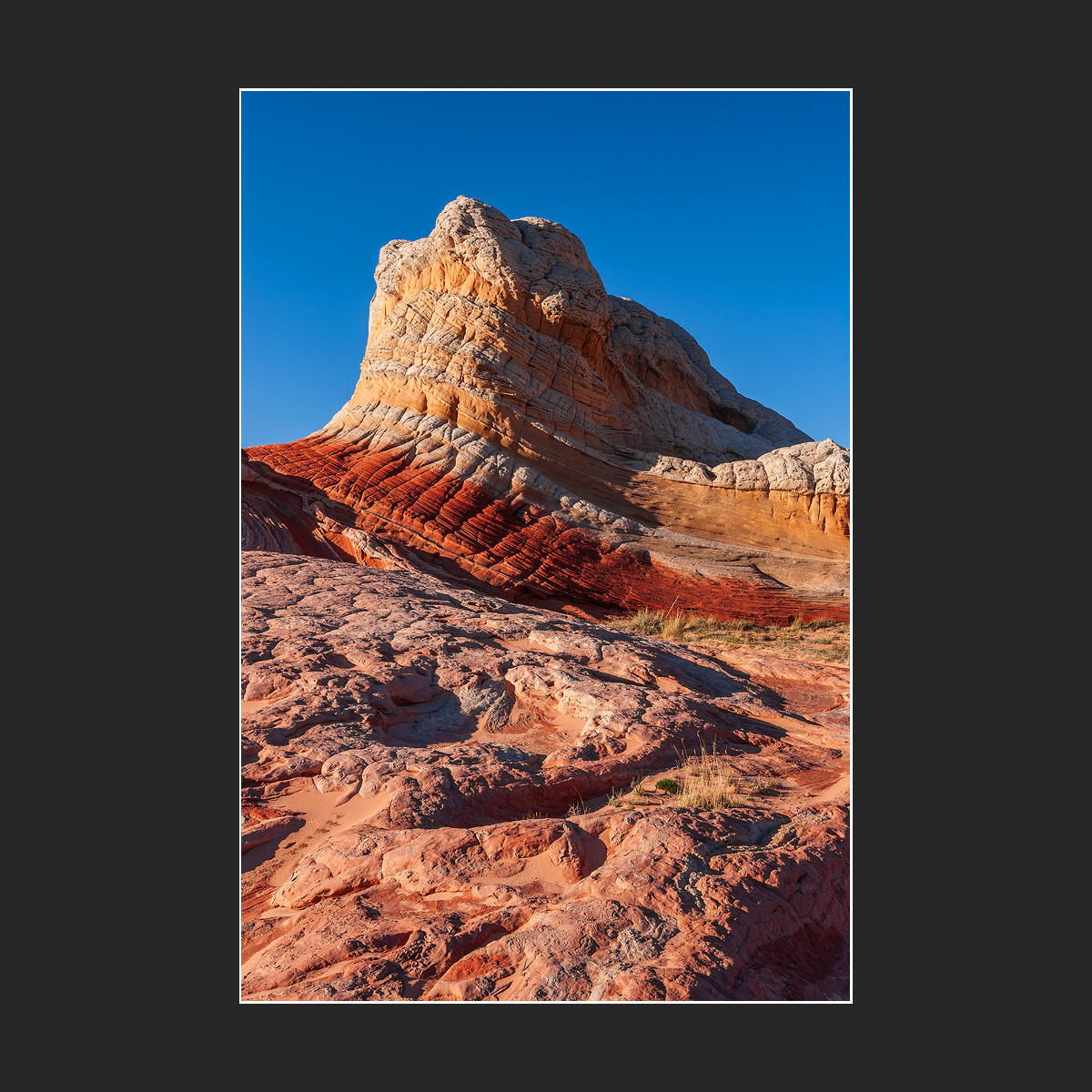
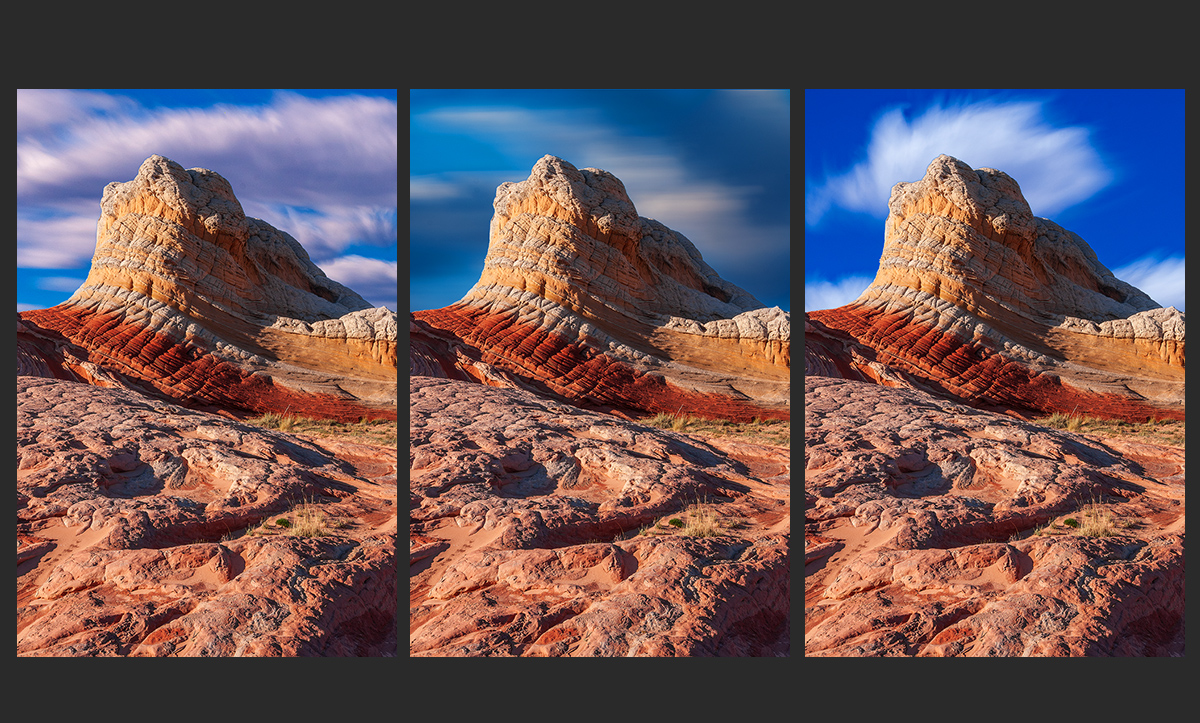
I've only once been to the White Pocket in Northern Arizona, camped there for 2 nights in October hoping for epic skies to go with the awesome rocks on display. No such luck - a few wisps around mid day but only stark blue skies at sunrise and sunset. Now I've tried letting Adobe add some fake clouds for me. What do you think - do they seem real enough? Do they appear to match the foreground in tone and color enough to be believed? I feel shame just showing these to you.

Here's the real thing ...

026.jpg


And here are the blasphemous edits ...

027.jpg
 

AlanLichty

Moderator
It does look nice with naked skies but if I had to choose one of the enhanced versions I would go with #1. It feels more real than the other two options.
 

JimFox

Moderator
Staff member
Hey Michael,

I like the original as well, though I can definitely understand wanting clouds.

I am not sure I like and of the 3 samples. Thinking about it, this image doesn't have much sky, so it would be hard to get the nice large puffy clouds I was imagining would be nice.

I think #3 has the right idea, though it doesn't quite work. With Alan's choice of #1, maybe if the clouds were less magenta looking it would fit better.

I just thought of this.... in the Milky Way circles I am sure you have seen where it's very popular for people to capture their ground layer at twilight, and then later that night go to an area where the land is often flatter to use a star tracker and capture a dozen images of the Milky Way to stack with the original ground layer taken at twilight.

I personally am not a fan of this, I don't mind blending images at night from different times, but I do believe that it's wrong to move the tripod to a new spot, which is sometimes miles away from the ground layer location to then use. Most of the people are upfront about it, which is good, but that doesn't mean I like that idea any better...

So.... all of that said to where maybe you should just take some of your clouds from previously in the day and then blend them in this image? If it's okay to do it with Milky Way images, maybe it should be okay with regular landscape as well? I am not saying it is, or should be, but I think it's something to consider these days as we blur the lines between reality and acceptable composites.
 

MonikaC

Well-Known Member
No shame in trying out these things, more like bravery to try them & post. I don't care for any of the clouds -- they're all long exposure, but still not long enough to work with your image. Maybe in BW? Yes, you lose the colors, but still get the contours. Or specify what kind of clouds? Probably would have been better to look for more intimate shots in those conditions.

Were there many people there? Last time I went (many years ago, or so it seems) there was a Japanese film crew there filming ads for Sony.........
 

Beth

Well-Known Member
the original image is excellent. none of the sky replacements work for me, but i think another sky with some subtle clouds would work really well.
 

Jim Sanderson

Well-Known Member
I composite images frequently. Adding clouds to a lifeless sky can help a composition in many instances. I often take pictures with saving the sky in mind and add them to a file for just such an occasion. I have a lot of skys in the file. In your shot, I think the original blue sky adds a nice color contrast to the shot. Of the cloud variations I like the first although the shutter speed of the sky’s seems a bit off.
 

Michael13

Moderator
Hey Michael,

I like the original as well, though I can definitely understand wanting clouds.

I am not sure I like and of the 3 samples. Thinking about it, this image doesn't have much sky, so it would be hard to get the nice large puffy clouds I was imagining would be nice.

I think #3 has the right idea, though it doesn't quite work. With Alan's choice of #1, maybe if the clouds were less magenta looking it would fit better.

I just thought of this.... in the Milky Way circles I am sure you have seen where it's very popular for people to capture their ground layer at twilight, and then later that night go to an area where the land is often flatter to use a star tracker and capture a dozen images of the Milky Way to stack with the original ground layer taken at twilight.

I personally am not a fan of this, I don't mind blending images at night from different times, but I do believe that it's wrong to move the tripod to a new spot, which is sometimes miles away from the ground layer location to then use. Most of the people are upfront about it, which is good, but that doesn't mean I like that idea any better...

So.... all of that said to where maybe you should just take some of your clouds from previously in the day and then blend them in this image? If it's okay to do it with Milky Way images, maybe it should be okay with regular landscape as well? I am not saying it is, or should be, but I think it's something to consider these days as we blur the lines between reality and acceptable composites.
This was my first time telling adobe to make me some clouds. I don't think I need to spend any more time on it. I know they are all fake and only the first one could pass as real to my eye. This is a great tool for building an image from scratch but there is no fun in it for me and I don't feel the joy of making photos that comes from processing what I shot myself. Thanks but no thanks Adobe.
 

Michael13

Moderator
No shame in trying out these things, more like bravery to try them & post. I don't care for any of the clouds -- they're all long exposure, but still not long enough to work with your image. Maybe in BW? Yes, you lose the colors, but still get the contours. Or specify what kind of clouds? Probably would have been better to look for more intimate shots in those conditions.

Were there many people there? Last time I went (many years ago, or so it seems) there was a Japanese film crew there filming ads for Sony.........
For 2 days I shot a lot of patterns in rock photos, without any sky in the image. Where I did include sky, it was a low percentage of image area. You got to shoot the conditions you are dealt. These photos are from 2007 and I had the whole place to myself for most of those 2 days!
 

Michael13

Moderator
the original image is excellent. none of the sky replacements work for me, but i think another sky with some subtle clouds would work really well.
Thanks Beth. I agree, there is something off with the fake clouds. I guess I could try to refine the cloud choices Adobe is giving me but I'm not feeling good about going in that direction.
 

JimFox

Moderator
Staff member
Thanks Beth. I agree, there is something off with the fake clouds. I guess I could try to refine the cloud choices Adobe is giving me but I'm not feeling good about going in that direction.
I am with you Michael. It was fun to play with a time or two, but even knowing when I tried it that I wasn't going to do anything with the end result, my gut was feeling bad and I was kind of feeling guilty inside. I think too many years of trying to accurately capture a location, and if the conditions weren't right, well then I would just return again. I think that's a huge portion of the fun is the chase for the right conditions. Faking them in Photoshop just didn't feel right, now was there any real joy in it.
 
Top Bottom