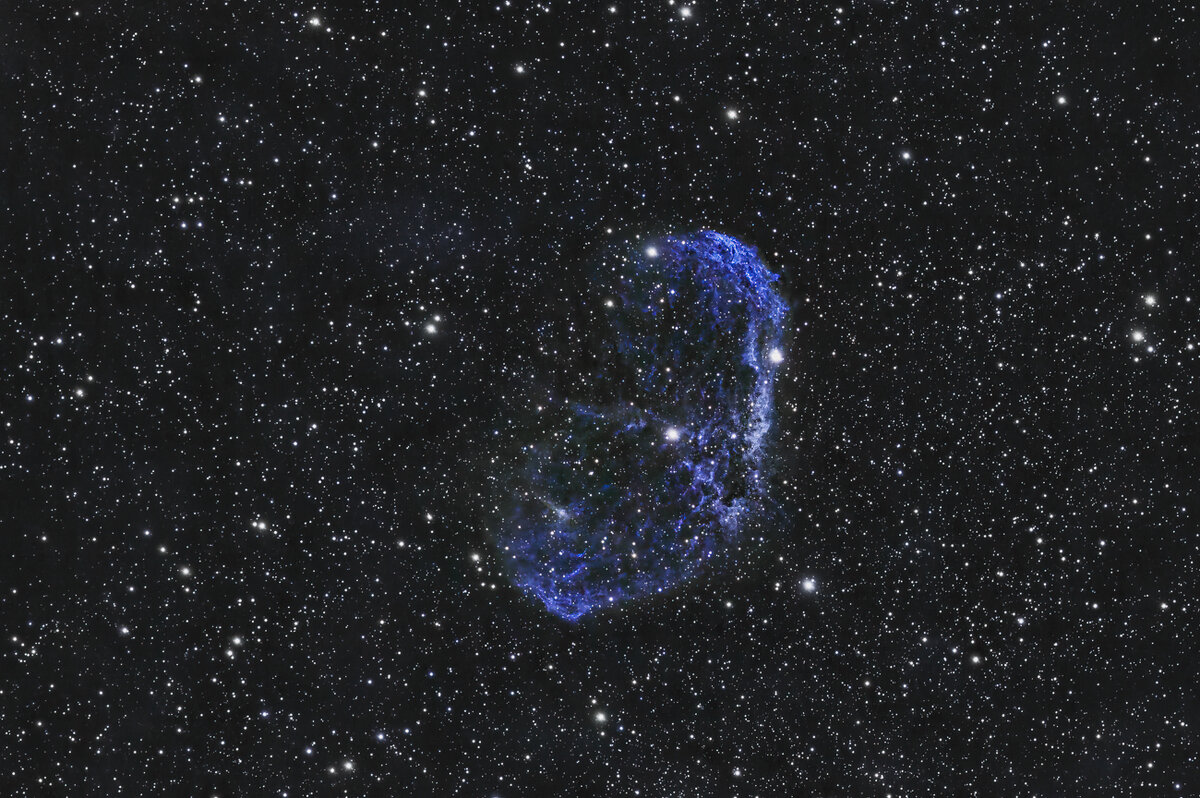
Crescent Nebula

Bob Israel

Well-Known Member
I've heard that Pixinsight has a steep learning curve. Well, it does! I've had tons of help from @JimFox to get me started, thank you! I have also done my share of youtube tutorials. Maybe it's my age but it's one thing to watch and another to do. I'm getting there . . .

Crescent Nebula
40 minutes total integration @ 15s each.
Bortle 5 skies
Pixinsight, Lighroom Classic and a bunch of tools within each.

I think some of my exposures were too close to dawn as I had some gradients I just couldn't get rid of. So this image is cropped. There are other tools I need to add to Pixinsight such as Stars Reducer. Anyway, Pixinsight is a journey. The Celestron Origin is a wonder.
crescentnebula-Edit.jpg
 

JimFox

Moderator
Staff member
Hey Bob, it's a learning curve for sure. The processing is always the hardest and takes the longest to pick up. You are doing really good, I am glad I could help a bit.

How did you get this to be blue? It's kind of odd looking. You got lot's of nice detail, but the color is a bit different. :) As a suggestion, I would say, to keep the objects in their original colors from the camera initially. Just so you can see and appreciate the primarily Ha color out there.

But again, the detail you are getting is really great! That Origin is really looking to be worth the money!

As to cropping, it's a personal thing, but I don't feel there is any need to mention it was cropped. you will find that 95% of you images will be cropped. So cropping is totally normal, and almost every Astro image is cropped.

As to Star Reducing, it looks like you are using Lightroom rather then Photoshop, so this may not work for you. But for Photoshop there is a set of Astro Actions called Star Tools. It's super cheap. In it, there is an action called, "Make Stars Smaller". It's my favorite way to reduce stars. There is no setting, it just ever so slightly reduces the stars. So on a typical image, I may just run that action 3 to 6 times in a row, until the stars are reduced to the look that I want. The star reduction options in Pixinsight, I tried them, but found them overly complicated, and I didn't really like the look after. So look into Star Tools, for a super simple way to reduce stars.
 

Bob Israel

Well-Known Member
Thanks again, Jim! I was using a nebula filter when capturing the image. It came out of the scope looking blue which I realized is not as realistic. I don't know if its the filter causing this and at this point, I didn't want to mess around too much to change it as I'm trying to nail down my workflow.

I am liking the level of detail I am getting. More practice, more practice but I'm encouraged . . .
 

Andy Elliott

Well-Known Member
Well done, you have a lot of nice detail there. As Jim says, the blue colour is unusual. Keep going with PI, it certainly is a lot to get your head around. I have been using it for about 18 months now; it was pretty daunting at first, and you can easily get bogged down with You Tube overload. You will find that as things get more familiar, you will develop your own workflow. Keep with the standard processes at first, then you can start to delve into the wonderful world of Scripts, of which there are many, but are worth exploring.
 

Bob Israel

Well-Known Member
Well done, you have a lot of nice detail there. As Jim says, the blue colour is unusual. Keep going with PI, it certainly is a lot to get your head around. I have been using it for about 18 months now; it was pretty daunting at first, and you can easily get bogged down with You Tube overload. You will find that as things get more familiar, you will develop your own workflow. Keep with the standard processes at first, then you can start to delve into the wonderful world of Scripts, of which there are many, but are worth exploring.
Thanks Andy! I greatly appreciate the encouragement. As to the blue color, I get this straight ouf of the scope. I'm wondering if it is the result of the Celestron Origin nebula filter that I used for this and a couple of other images. It's supposed to cut down on light pollution and enhance nebula contrast. I'll need to try imaging the same targets without the filter. Here are the brief specs if anyone can comment.

7859FAAF-4D41-475C-BF14-A78BFCFE706E.jpeg
 

JimFox

Moderator
Staff member
Hey Bob, I only have a few moments, I am heading to backpack in the Rockies.

Those filters don't change colors, the restrict wave bands. The result being that the Ha, OIII and SII signals appear to be enhanced.

Any color changes will be coming from an error in your processing. Remember when you switched a setting from mono to RGGB? I would bet that's where your colors are getting swapped. I am not in front of my computer as I am on the road, but I believe mine is set to RGB not RGGB. Your sensor is putting out RGGB, and done apps need that. But I am thinking that WBBP just selects RGB.
 

Bob Israel

Well-Known Member
Hey Bob, I only have a few moments, I am heading to backpack in the Rockies.

Those filters don't change colors, the restrict wave bands. The result being that the Ha, OIII and SII signals appear to be enhanced.

Any color changes will be coming from an error in your processing. Remember when you switched a setting from mono to RGGB? I would bet that's where your colors are getting swapped. I am not in front of my computer as I am on the road, but I believe mine is set to RGB not RGGB. Your sensor is putting out RGGB, and done apps need that. But I am thinking that WBBP just selects RGB.
I was thinking the exact same thing and will try the BGGR setting. I will also retry AUTO.
 
Top Bottom