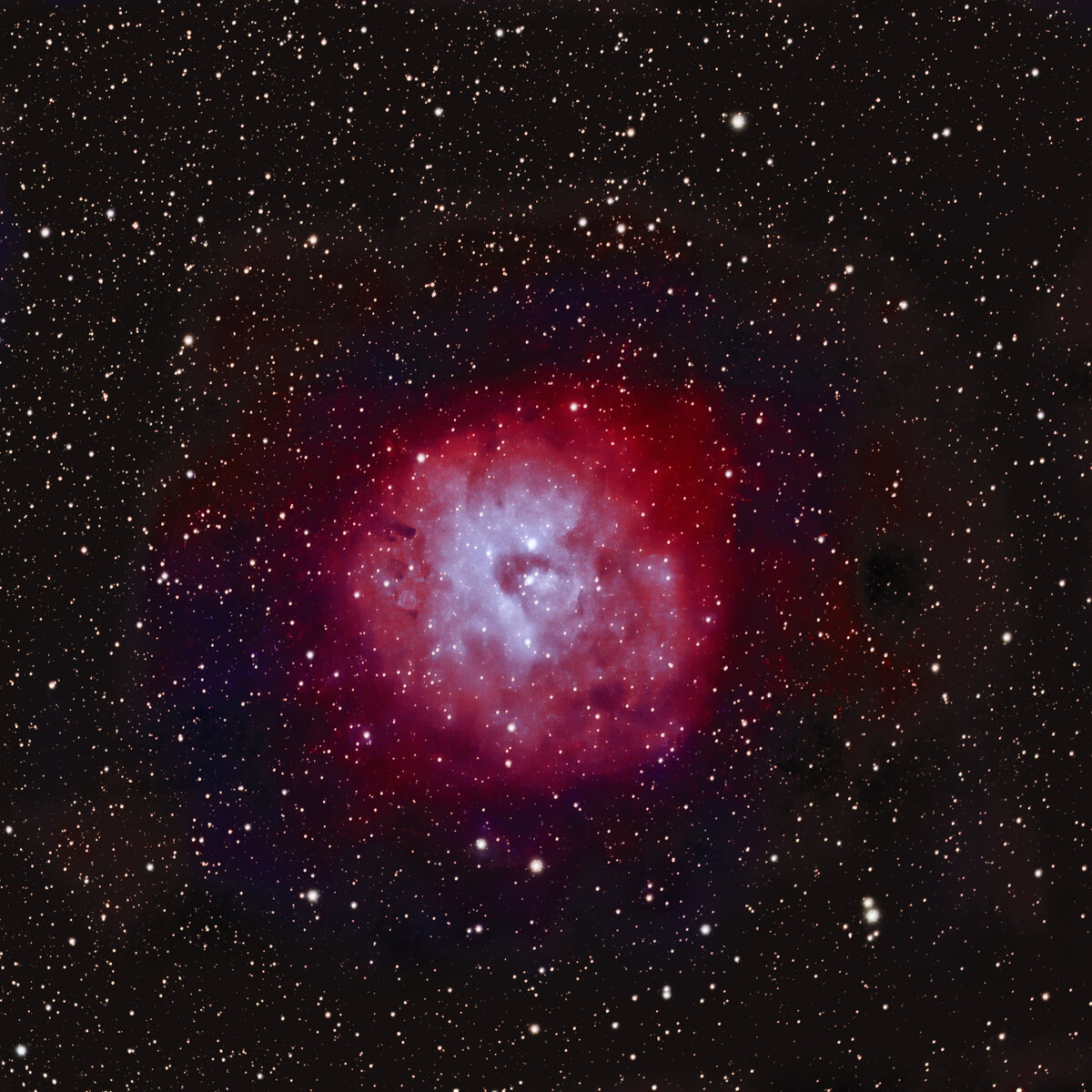
SH2-170 Little Rosette Nebula in Cassiopeia.

Andy Nowlen

Well-Known Member
We have had almost 2 months of clouds and rain. Now it looks like I will entirely miss the upcoming new moon shooting opportunity. November 30 there was a small clear night sky opening and sadly it is the last actual single-night imaging session I managed in 2021. I managed only 4 hours of exposure, but I am happy with my result for this year.

The HOO bi-color processing method made it a little difficult to color correct the background, but it is ok for what it is.
Explore Scientific 102mm @ 714 mm
Ioptron CEM40 mount
AsiAir Pro controller
Asi533mc pro camera
Optolong L-extreme filter
70 total exposures split between 300 seconds, 240 seconds, 180 seconds. I decided to shorten exposures because I was concerned about light pollution around my house.
Astropixel Processor
Pixinsight
Photoshop - Stars from a stacked RGB image were removed from the RGB image with Star-xterminator.
Secondly, starless versions of the HA and Oiii files were combined in Photoshop and the RGB stars were added back into the image.

SH2 170 Little Rosette Nebula BiColor.jpg
 

K-Monteløv

Active Member
We have had almost 2 months of clouds and rain. Now it looks like I will entirely miss the upcoming new moon shooting opportunity. November 30 there was a small clear night sky opening and sadly it is the last actual single-night imaging session I managed in 2021. I managed only 4 hours of exposure, but I am happy with my result for this year.

The HOO bi-color processing method made it a little difficult to color correct the background, but it is ok for what it is.
Explore Scientific 102mm @ 714 mm
Ioptron CEM40 mount
AsiAir Pro controller
Asi533mc pro camera
Optolong L-extreme filter
70 total exposures split between 300 seconds, 240 seconds, 180 seconds. I decided to shorten exposures because I was concerned about light pollution around my house.
Astropixel Processor
Pixinsight
Photoshop - Stars from a stacked RGB image were removed from the RGB image with Star-xterminator.
Secondly, starless versions of the HA and Oiii files were combined in Photoshop and the RGB stars were added back into the image.


View attachment 45456
Woow beautiful 😍
 

AlanLichty

Moderator
Your results with this image are impressive and more so given how few hours of nighttime viewing was possible since November.

Your weather sounds a lot like what I have seen in December - are you in the Portland OR area?
 

JimFox

Moderator
Staff member
Wow! Awesome view Andy! I like your Little Rosette, I need to look that one up. This may be the first time I have seen it.

It's been raining here in SoCal, but clear skies are in the forecast for the next few days. I am doing a quick run out to Joshua Tree tomorrow to make another attempt at the Leonard Comet. I shot it 2 weeks ago, but the full moon really made it hard.
 

Andy Nowlen

Well-Known Member
Your results with this image are impressive and more so given how few hours of nighttime viewing was possible since November.

Your weather sounds a lot like what I have seen in December - are you in the Portland OR area?
I am in Eugene. Maybe we can do a meet up one day.
 

Andy Nowlen

Well-Known Member
PS. I hadn't heard of StarExterminator before. How did you like it?
I have found it to be very good. None of the star removal tools work effectively on every image. So far, I like the Photoshop version results better than in Pixinsight. But that might also be that I have more experience in PS. I always prep the image as best I can before starx. Remove noise, run 'Make Stars Smaller' then I put a curves or levels layer above the one I want to use and make it a bit brighter.
 

AlanLichty

Moderator
I am in Eugene. Maybe we can do a meet up one day.
One of my favorite waterfall destinations is practically in your backyard - Sweet Creek over near Mapleton. I spend a lot of time out along the OR coast mostly between Florence and Brookings during the winter months mostly looking for breaks in between storms.
 

JimFox

Moderator
Staff member
I have found it to be very good. None of the star removal tools work effectively on every image. So far, I like the Photoshop version results better than in Pixinsight. But that might also be that I have more experience in PS. I always prep the image as best I can before starx. Remove noise, run 'Make Stars Smaller' then I put a curves or levels layer above the one I want to use and make it a bit brighter.
Thanks so much Andy!

I still haven't used Pixinsight. I use DeepSkyStacker and Photoshop to process mine, one day I will take the leap to Pixinsight. But currently I am just using my DSLR for capturing, so Pixinsight might be overkill for it. And still being new to Astrophotography, there is a huge comfort level for me in processing in Photoshop. So knowing that works inside of Photoshop is a huge benefit. Starnet++ only worked so so for me. A couple of times in worked really nice, but most of the times it left behind some really bad artifacts that just were getting to be too much of a pain to clean up.

I noticed you have the L-Extreme. I am hoping to soon upgrade to the ASI294mc Pro, but was thinking of starting off with the L-Enhance filter first I know it's not quite as narrow, but I have seen nice images from it, and the halo's on stars I have been seeing from the L-Extreme kind of turned me off. In addition I read that the L-Extreme blocks more light, and with using a DSLR lens still, I wanted a filter that even if it's just a stop brighter, that will be a lot for my lens I think. It sounded like the L-Enhance was a little more forgiving and perhaps an easier choice as I am still quite the noobie in all of this. What do you think?
 

Andy Nowlen

Well-Known Member
Thanks so much Andy!

I still haven't used Pixinsight. I use DeepSkyStacker and Photoshop to process mine, one day I will take the leap to Pixinsight. But currently I am just using my DSLR for capturing, so Pixinsight might be overkill for it. And still being new to Astrophotography, there is a huge comfort level for me in processing in Photoshop. So knowing that works inside of Photoshop is a huge benefit. Starnet++ only worked so so for me. A couple of times in worked really nice, but most of the times it left behind some really bad artifacts that just were getting to be too much of a pain to clean up.

I noticed you have the L-Extreme. I am hoping to soon upgrade to the ASI294mc Pro, but was thinking of starting off with the L-Enhance filter first I know it's not quite as narrow, but I have seen nice images from it, and the halo's on stars I have been seeing from the L-Extreme kind of turned me off. In addition I read that the L-Extreme blocks more light, and with using a DSLR lens still, I wanted a filter that even if it's just a stop brighter, that will be a lot for my lens I think. It sounded like the L-Enhance was a little more forgiving and perhaps an easier choice as I am still quite the noobie in all of this. What do you think?
HI, I think your observations about the filters are spot on. I started with the enhance, and when I set up a second rig I went with the extreme. The halo problem seems worse on some images. I suppose slight changes in angle make a difference, but I am not an expert at all. I like the extreme mostly because it is more effective when dealing with light pollution.

The 294mc pro has certainly developed a massive following. That should be fun. What scope or lense are you using? Shortly I am going to post one of my very first images shot with my EOS R and my Canon 100-400mm @ 400mm.

Happy New Year!
 
Last edited:

Mike Lewis

Staff Member
Andy,

This is special - and like Jim above, I will have to go research this object, was not familiar with it. Love the colors and the details in this one!

ML
 
Top Bottom