Updated Waterton Lake Night

Kyle Jones

Moderator
I've made it to my real computer and spent some time with this one. If you want to see the previous (single file, tablet edit) version, you can find it here.

This update does away with most of the vertical distortion from tilting the camera up and uses data from another image to better control the lights from the hotel. Any thoughts are welcome.
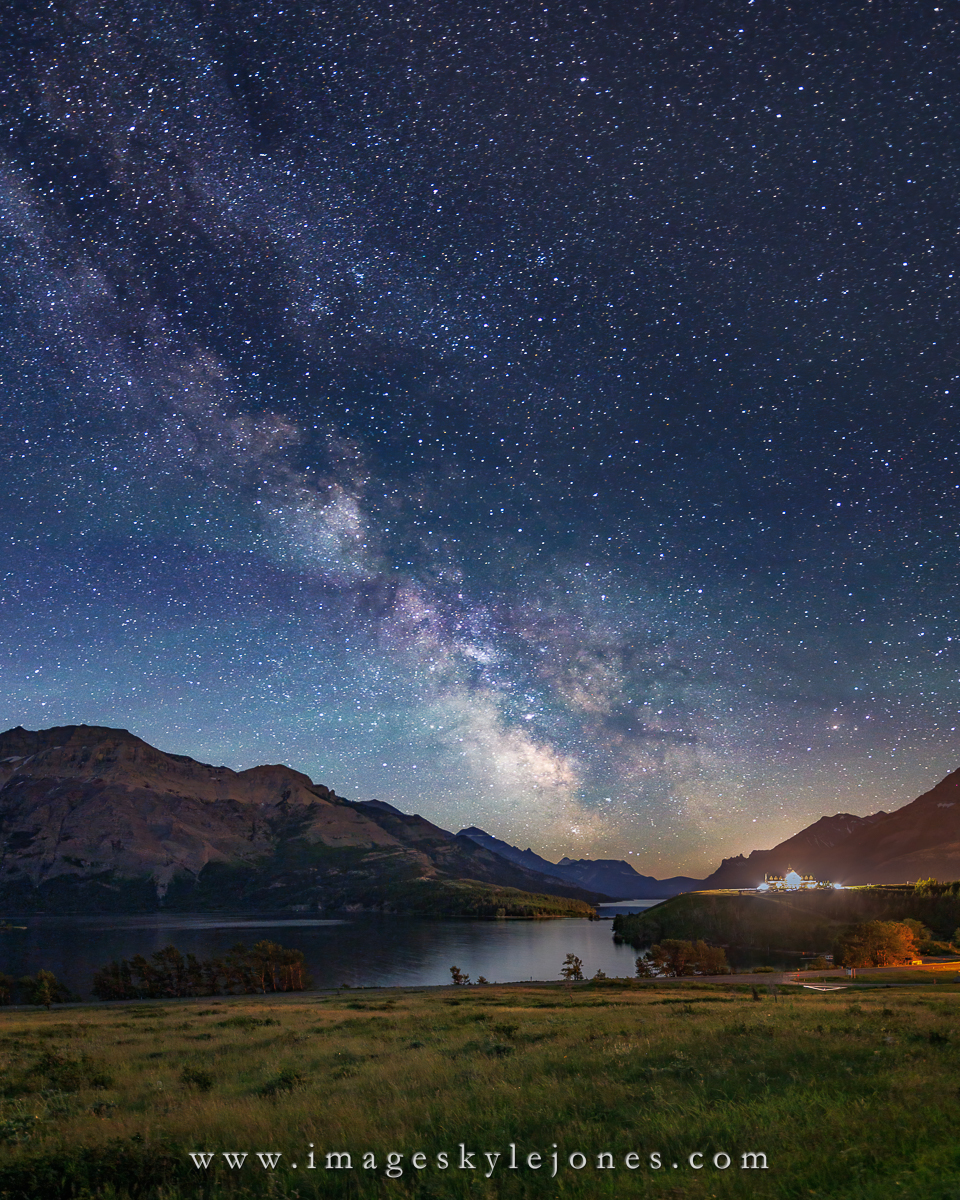
0955 Waterton Lake Night_1200.jpg
 

JimFox

Moderator
Staff member
Hey Kyle, first off I love the Milky Way. A very natural look to it. Your work on the computer paid off for it. The composition is cool, I like the grasses and the foreground, along with the placement of the slopes in the background.

I can definitely tell the hotel looks way better. But... I think those couple of blown out areas, especially that large area does distract from the Milky Way and pulls the eye to it. I know if you pull back on the highlights more, those areas just turn gray, so that's not a solution. You almost need a twilight shot of the hotel to plug in there.

This is one of the best Milky Way images I have seen this year so far. But that hotel, despite your work is still grabbing my eye too much.
 

Ken Rennie

Well-Known Member
Beautiful composition Kyle. I would be tempted to clone out the hotel lights as Jim noted try and darken them any more and they will turn muddy grey. For me the sky and therefore the Milky Way is just too bright but I think that about almost all Milky Way shots that I see so you can safely ignore this comment. I am fascinated by the 2 different colours of blue in the sky and am still trying to work out why. Ken
 

Kyle Jones

Moderator
OK, I've made one more pass at taming the lights a little bit. The hotel is an icon in the park so cloning it out isn't an option. I don't mind it catching the eye, but I don't want just a bright blur either. I appreciate the comments.

Ken - there is definitely some airglow in the sky, showing as bands of green and purple.

0955 Waterton Lake Night_1200.jpg
 

JimFox

Moderator
Staff member
Okay Kyle! Now this is perfection! I agree you couldn't clone the hotel out. The recovery now is perfect. It's not a large solid point of light, but it's broken down into the windows, etc. that really helped!
 

Kyle Jones

Moderator
Okay Kyle! Now this is perfection! I agree you couldn't clone the hotel out. The recovery now is perfect. It's not a large solid point of light, but it's broken down into the windows, etc. that really helped!
Thanks Jim! My solution for blending was to pick one of my dark exposures and raise the shadows (noise and all) to match my base exposure. That made it much easier to mask in without obvious artifacts.
 

JimFox

Moderator
Staff member
Thanks Jim! My solution for blending was to pick one of my dark exposures and raise the shadows (noise and all) to match my base exposure. That made it much easier to mask in without obvious artifacts.
Great idea! Something that small, even if it turned a bit plastic from overusing NR, no one would ever see it there.
 
I've made it to my real computer and spent some time with this one. If you want to see the previous (single file, tablet edit) version, you can find it here.

This update does away with most of the vertical distortion from tilting the camera up and uses data from another image to better control the lights from the hotel. Any thoughts are welcome.

View attachment 74212
Kyle, this is a sweet night shot.

Oliver
 
Top Bottom