Point Bouchon in B&W

JimFox

Moderator
Staff member
Another from Morro Bay and Point Bouchon, this time in B&W. With this wider shot that captured the grasses and vegetation, everything was so dry and dead looking that I really didn't like at all how it looked, so I went with B&W as the best way to mask that dead brown color. When I do get back here it will for sure be in the spring when things are still green. :)

All comments are welcome, you can see a few more of the arches and sea stacks in this. What a super cool place that must have been before all of the erosion.

Jim
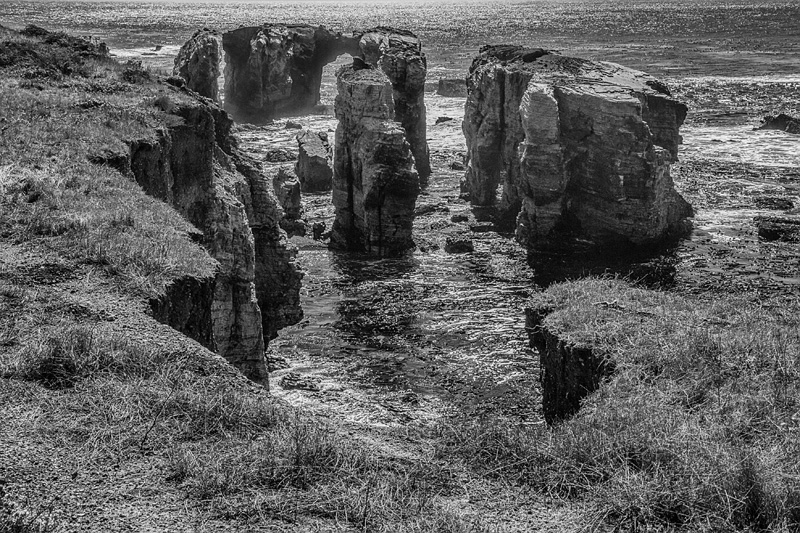
_DSC6282_BW_dw.jpg
 

AlanLichty

Moderator
Interesting rock formations - it almost looks like a bit of an arena shape for the remaining stacks here.

I kind of wish there was a bit more contrast in this B&W. This feels a bit flat to me.
 

JimFox

Moderator
Staff member
You have a nice composition here Jim, I have to agree with Alan on the flatness.
Thanks you guys. As for the flatness it was way worse before as I was shooting into the sun. So I have added tons of contrast to the original and even extra contrast in some areas. But certainly I can go back and add some more, I just don't want to lose shadow detail which is getting pretty low now.

If anyone wants to take this and add more contrast, have at it. :)
 

AlanLichty

Moderator
A bit of a quick hack job from a small jpeg without color channels:

PointBouchon.jpg


I dropped it into Camera RAW and brought up the whites to just below clipping and brought the black point up to clipping. Added some shadow to get good contrast in the rocks and then added some clarity.
 

JimFox

Moderator
Staff member
Interesting Alan, that's true I didn't make it easy with just a low rez B&W. This might make for a good Let's Play if Ben wants to use it.
 

Ben Egbert

Forum Helper
Staff member
Certainly Jim. I do have one for this week, but what might make senses is to allow 3k PNG upload to the resources without autmatically creating a thread so we could build up an inventory of images. If that is possible.
 
A bit of a quick hack job from a small jpeg without color channels:

View attachment 9722

I dropped it into Camera RAW and brought up the whites to just below clipping and brought the black point up to clipping. Added some shadow to get good contrast in the rocks and then added some clarity.
I like what you have done here with the stacks, Alan but the grasses look a tad over sharpened. Did the increase in clarity do that?
 

AlanLichty

Moderator
I like what you have done here with the stacks, Alan but the grasses look a tad over sharpened. Did the increase in clarity do that?
Yes - I tried to back it off a bit but it still left too much crunchy down there. This was a very quick hack on Jim's B&W jpeg and not a serious edit on something like the DNG files we use for Let's Play.
 

JimFox

Moderator
Staff member
Certainly Jim. I do have one for this week, but what might make senses is to allow 3k PNG upload to the resources without autmatically creating a thread so we could build up an inventory of images. If that is possible.
It is possible Ben, I can have it not create that thread automatically. The one thing I like about the Automatic creation is it puts that Download Button in the thread. I need to find if there is another way to get that Download button to show up. I will turn off the auto Thread creation later today, and we can see how we like it.
 

Alisa

Well-Known Member
Another from Morro Bay and Point Bouchon, this time in B&W. With this wider shot that captured the grasses and vegetation, everything was so dry and dead looking that I really didn't like at all how it looked, so I went with B&W as the best way to mask that dead brown color. When I do get back here it will for sure be in the spring when things are still green. :)

All comments are welcome, you can see a few more of the arches and sea stacks in this. What a super cool place that must have been before all of the erosion.

Jim

View attachment 9720
This is nice but have to agree with Alan about needing a bit more contrast. I love B&W images.
 
Top Bottom