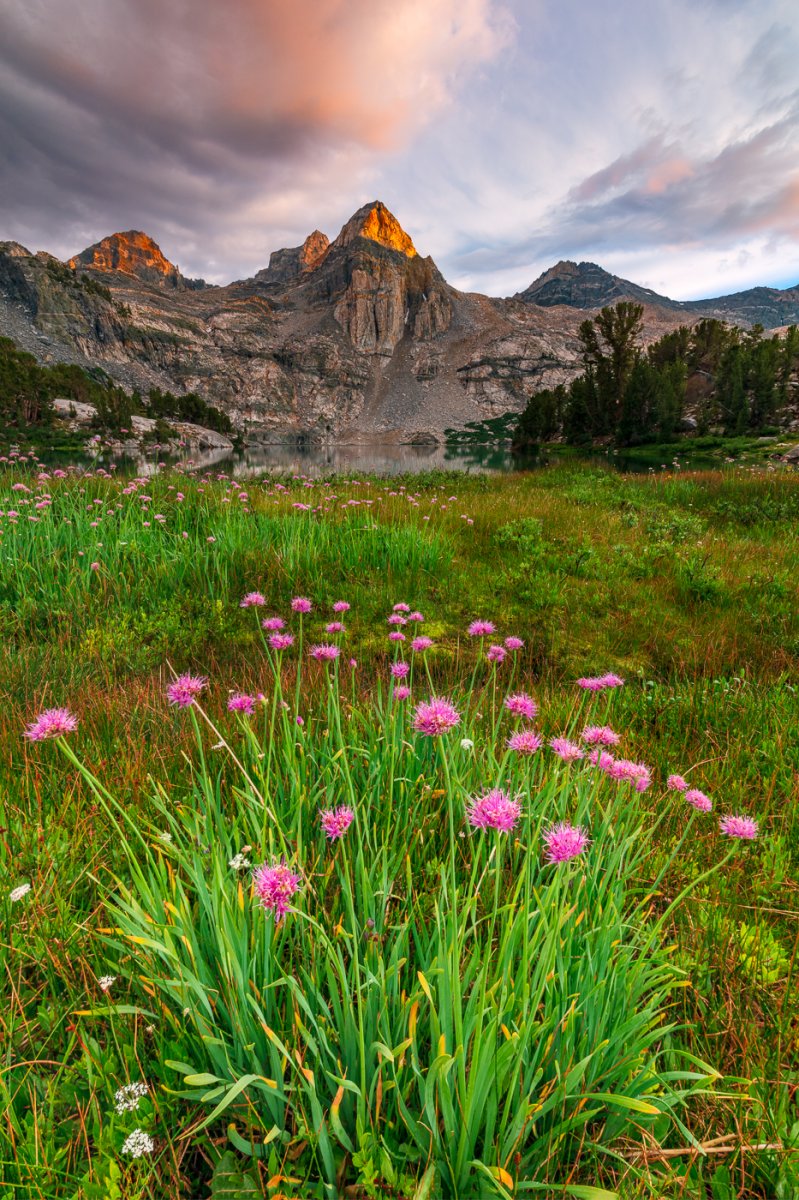
Evening Blush

Dave Dillemuth

Well-Known Member
I captured this image on a recent backcountry excursion in the High Sierra. I was holed up in my tent for several hours by heavy rains into the early evening and for a while it seemed the evening shoot might be a bust but right before sunset the clouds began to break up allowing some light through. This raw file had a very strong yellow cast from reflected sunset light and I have struggled mightily with my feeble Photoshop skills to get the colors to my liking. Any input/suggestions appreciated.


_U1A7002-Edit-2.jpg
 

AlanLichty

Moderator
The color cast to the image you posted appears quite natural. I like the floral focus down in front for a foreground and the reflections/peaks behind are nicely framed.

If you want some help in correcting colors you might want to post this in the critique forum and/or maybe a Let's Play session.
 

Ben Egbert

Forum Helper
Staff member
The color cast to the image you posted appears quite natural. I like the floral focus down in front for a foreground and the reflections/peaks behind are nicely framed.

If you want some help in correcting colors you might want to post this in the critique forum and/or maybe a Let's Play session.
That is an excellent suggestion Alan.
 

Jim Dockery

Well-Known Member
Looks good to me, but the evening alpenglow can often lend a nice warm glow to things. I wouldn't mind seeing how it looks without trying to adjust for it.
 

JimFox

Moderator
Staff member
I like this one a lot Dave! Those foreground wildflowers with the peaks being kissed and some of that nice coloring in the clouds is really cool.

I think you did pretty good with that color casting. Did you adjust the wildflower layer separate from the peaks and separate from the sky? Usually I will use several layer mask to separate the image into those 3 parts when adjusting for a color cast issue. I could see pulling back on the yellow just a bit more in the wildflower area, but I wouldn't want to remove any more from the rest of it.
 

Dave Dillemuth

Well-Known Member
I like this one a lot Dave! Those foreground wildflowers with the peaks being kissed and some of that nice coloring in the clouds is really cool.

I think you did pretty good with that color casting. Did you adjust the wildflower layer separate from the peaks and separate from the sky? Usually I will use several layer mask to separate the image into those 3 parts when adjusting for a color cast issue. I could see pulling back on the yellow just a bit more in the wildflower area, but I wouldn't want to remove any more from the rest of it.
Thanks, Jim. Yes, I did both local color balance and selective color adjustments. I'll try to pull back on the yellow a bit more in the foreground.
 

Dave Dillemuth

Well-Known Member
The color cast to the image you posted appears quite natural. I like the floral focus down in front for a foreground and the reflections/peaks behind are nicely framed.

If you want some help in correcting colors you might want to post this in the critique forum and/or maybe a Let's Play session.

Thanks, Alan. I'll consider your suggestion.

This is a gorgeous image, but I think you have something left to make it even better. I would reduce the yellow channel a bit.
Thanks for the input , Ben. I'll give it a try.
 

Jim Dockery

Well-Known Member
Thanks for the comparison Dave. I do prefer your edited version that brings out the clouds and flowers much better, and makes the last light on the peak really stand out.
 

teelermeeler

Well-Known Member
I really like the way you processed and shared the first image. It looks good. One suggestion would be to burn the foreground to isolate the flora more. Though I'm not sure that would make it that much better
 

J. M. Livingston

Well-Known Member
I really like your edited image in the first post. The colors are fantastic and the pop in the foreground and wildflowers are perfect!

My thoughts:You have 3 different images here. The original which I like, my eye goes up from the bottom, left-to-right across the lake, and then up the peak (see suggestion below). The second image is a square crop along the bottom of the image capturing just the bunch of wildflowers. Finally the third image, like the second is a square crop but of the upper part including the mountain and lake with the distant wildflowers as the foreground.

I'm a big fan of subtle vignettes, I think all three versions could use this just enough there to keep the viewers eye where you want it (think -13 to -17 with LR's vignette tool). Done the way I'm suggesting most people won't see it as a vignette though the pixel-peepers generally will. I usually use LR for my vignettes rather than PS, and often with the radial filter so I can control the shape and location rather than using the generic vignette tool which is so center-focused. Plus with the radial tool you can use it as a brush and then erase a little if it's feathered into a spot you don't want it.
 

J. M. Livingston

Well-Known Member
I captured this image on a recent backcountry excursion in the High Sierra. I was holed up in my tent for several hours by heavy rains into the early evening and for a while it seemed the evening shoot might be a bust but right before sunset the clouds began to break up allowing some light through. This raw file had a very strong yellow cast from reflected sunset light and I have struggled mightily with my feeble Photoshop skills to get the colors to my liking. Any input/suggestions appreciated.

View attachment 11055

I changed my mind. I don't "really like" this image as I said a moment ago. I love the edited image and I'm quite jealous of it. :)
 

Dave Dillemuth

Well-Known Member
Thanks, JM. Appreciate the comments and thoughtful suggestions. Gives me some food for thought. I too use the radial filter in LR frequently.
 
Top Bottom