

This is from some test data I was capturing at my Daughters back deck in Colorado. She lives in Bortle 5 skies, not as bad being in the city where you can't see any stars, but when you look up into the sky from her house, maybe by eye I can see 6 to 10 stars max. So this test was with 2 Light Pollution Filters I have. The Optolong L-Pro which is a very mild light pollution filter. And then the Optolong L-Enhance, which is much more agressive. It's not truly what's called a Dual Band or Narrow Band, but it still really limits the wavelengths of light it lets through, and it really focuses more on capturing the Ha (Red Color) in the galaxies or nebulas.
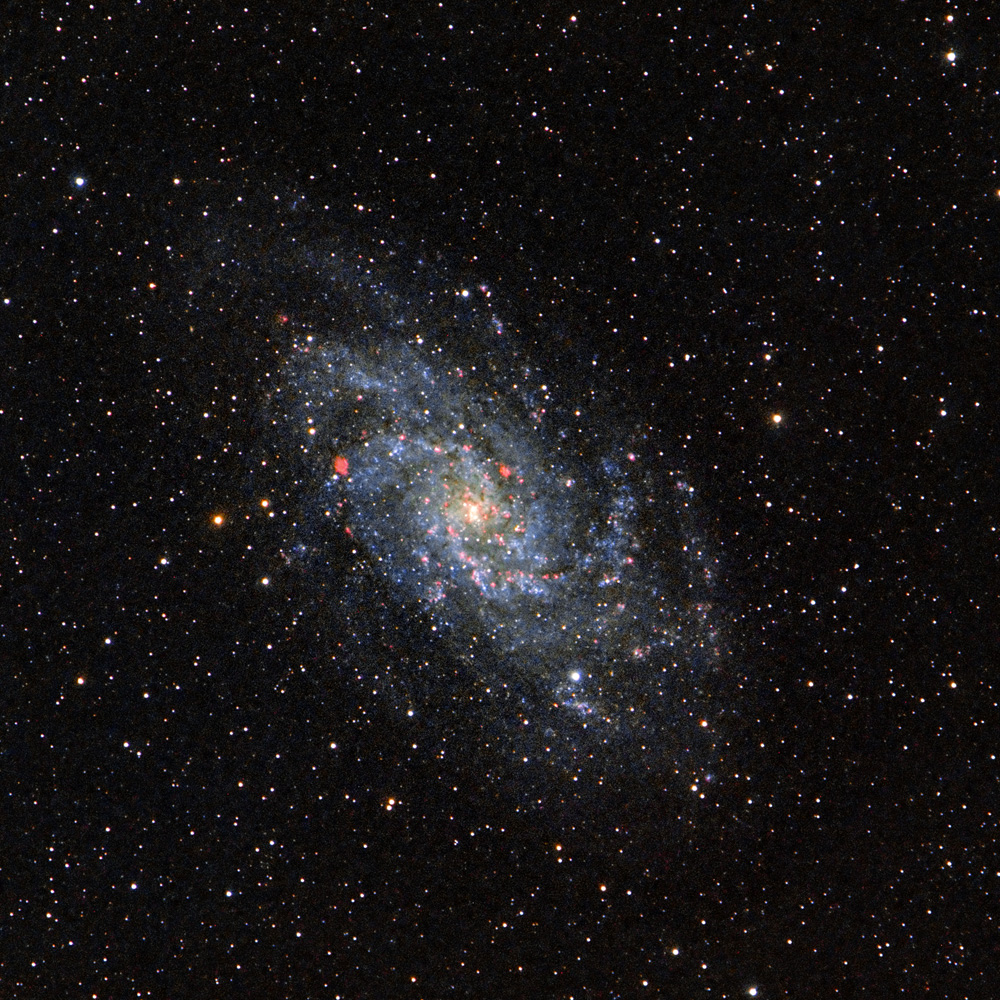
Since I started using Pixinsight a few weeks ago, one of the things that was high on my list to be able to produce was to combine the wide data of the L-Pro which captures all of the colors in the sky but not very agressively of a Galaxy, with the more agressive L-Enhance filter which would then show the Red star forming regions in the galaxies better.
If there was one thing I was a bit jealous from those shooting with the mono cameras, was their ability to capture those red star forming regions so distinctly. To perform the same magic with my color astro camera (OSC) would make me so happy!
So starting last night since I had this data from my test, I decided to start working on accomplishing my goals. I have off and on over the last few weeks been watching and studying a lot of videos on YouTube by various Astro guys on how to do it. So last night I reprocessed both the L-Pro and L-Enhanced captures of M33 separately, using some of the new things I had been learning along with a tutorial from High Point Scientific, an Astro supply company. I got both versions looking nice last night. This morning when I got up, I decided to look at a tutorial that had been recommended to me on added Ha data to the RGB data. As I went to the video, I started to scroll down the list to just see what else there was out there, and I came upon another tutorial by High Point Scientific addressing the combing the Ha to the RGB data. Since I was so impressed with their tutorial on how to process galaxies, I decided just watch that first. I liked their ideas, and followed along with my own data.
I liked the result, and I hope you guys like it to!
Very minimal data as this was just meant to be a test.
8 lights @ 180 secs (L-Enhance)
5 - Darks
10 - Flats
24 lights @ 120 secs (L-Pro)
10 - Darks
20 - Flats
ASI2600mc Pro - Astro Camera
ASI120mm Mini - Guide Camera
Tamron 150-600mm @600mm
iOptron Gem28 - astro mount
ASIAir Pro - astro computer
DeepSkyStacker - Stacking
Pixinsight - Processing
Photoshop - Finishing Touches
All comments are welcome,
Jim
PS. by no means is this perfect, but I think it's a huge leap forward from what I was doing before.
Since I started using Pixinsight a few weeks ago, one of the things that was high on my list to be able to produce was to combine the wide data of the L-Pro which captures all of the colors in the sky but not very agressively of a Galaxy, with the more agressive L-Enhance filter which would then show the Red star forming regions in the galaxies better.
If there was one thing I was a bit jealous from those shooting with the mono cameras, was their ability to capture those red star forming regions so distinctly. To perform the same magic with my color astro camera (OSC) would make me so happy!
So starting last night since I had this data from my test, I decided to start working on accomplishing my goals. I have off and on over the last few weeks been watching and studying a lot of videos on YouTube by various Astro guys on how to do it. So last night I reprocessed both the L-Pro and L-Enhanced captures of M33 separately, using some of the new things I had been learning along with a tutorial from High Point Scientific, an Astro supply company. I got both versions looking nice last night. This morning when I got up, I decided to look at a tutorial that had been recommended to me on added Ha data to the RGB data. As I went to the video, I started to scroll down the list to just see what else there was out there, and I came upon another tutorial by High Point Scientific addressing the combing the Ha to the RGB data. Since I was so impressed with their tutorial on how to process galaxies, I decided just watch that first. I liked their ideas, and followed along with my own data.
I liked the result, and I hope you guys like it to!
Very minimal data as this was just meant to be a test.
8 lights @ 180 secs (L-Enhance)
5 - Darks
10 - Flats
24 lights @ 120 secs (L-Pro)
10 - Darks
20 - Flats
ASI2600mc Pro - Astro Camera
ASI120mm Mini - Guide Camera
Tamron 150-600mm @600mm
iOptron Gem28 - astro mount
ASIAir Pro - astro computer
DeepSkyStacker - Stacking
Pixinsight - Processing
Photoshop - Finishing Touches
All comments are welcome,
Jim
PS. by no means is this perfect, but I think it's a huge leap forward from what I was doing before.
Last edited:


