

Mike Lewis
Staff Member
So here is my final image from the remote session, as my friend is traveling back to CO from AZ for a while. I hope to get back to imaging at the back part of March, and that will be with my higher magnification OTA.
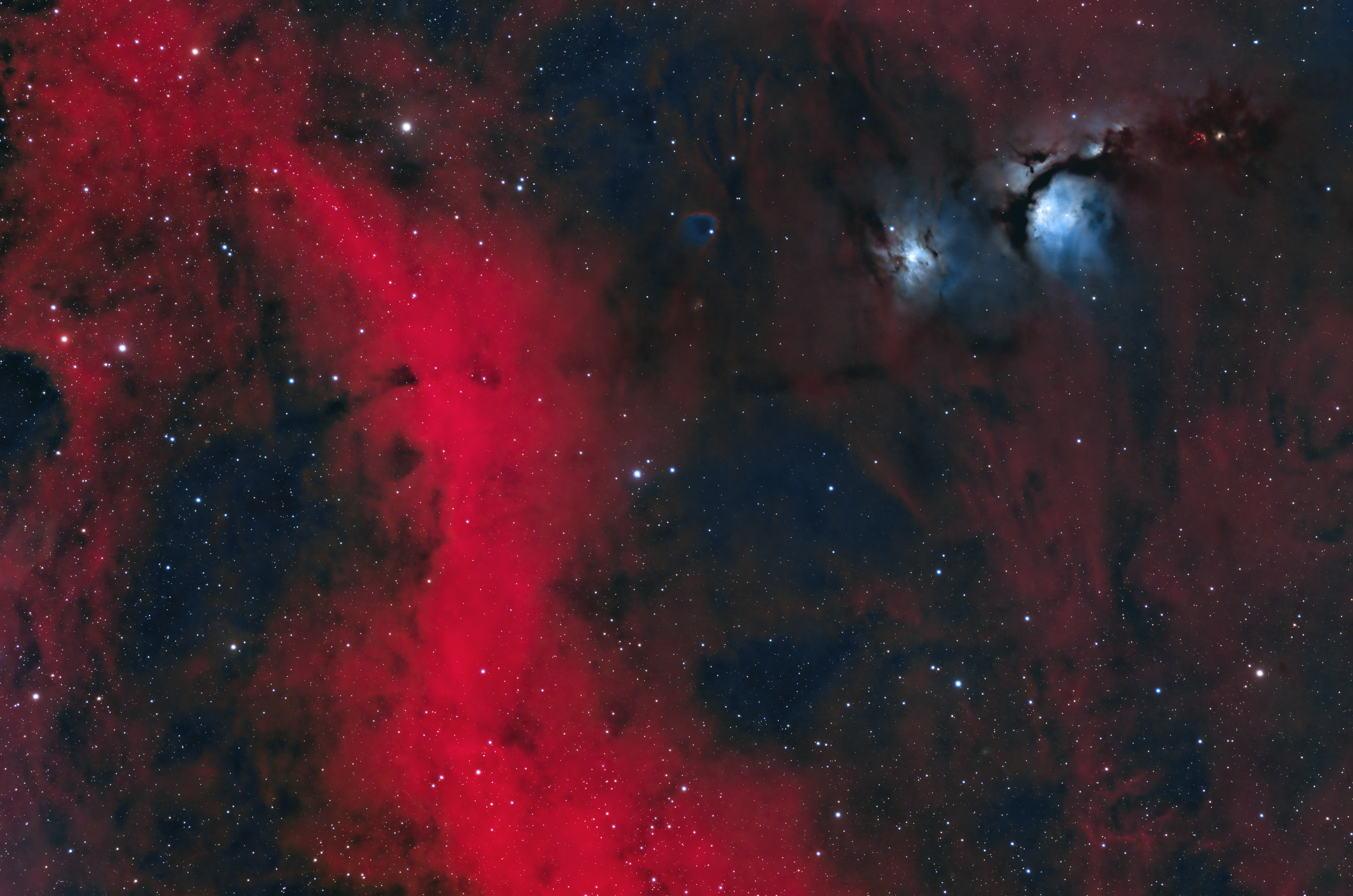
I REALLY introduced myself to a bunch a annoyance on the post-processing of this target. Even though I have had this same issue in the past, once again I ended up with a supposedly interim version made from less data being my final image because I could not duplicate the look when trying to reprocess the object with new data added. Sigh. But I finally decided that even using the ~3 hours of data from the 1st night instead of what would have been closer to 6 hours of data from 2 nights I ended up with a decent result.
Link to larger viewable version on Astrobin here:
https://www.astrobin.com/miwp5e/
This colorful region shows off both the blue reflection nebula known as M78, and also a glowing tendril of the much larger emission nebula called Barnard's Loop, both of which are part of the larger Orion Molecular Cloud Complex. The loop is a remnant of a supernova explosion estimated to have occurred approximately 2 million years ago. With a larger FOV Barnard's loop would be seen as a large and faint circular arc of gas slowly expanding outward from what was the supernova's epicenter. That cannot be seen in this image that only includes a small segment of the loop. But I did like the contrast between the blue reflection nebulosity red emission nebulosity.
This image was shot in natural light through RGB filters and then additional Hα data was collected and added to accentuate the portion of Barnard's Loop, as well as some of the very faint nebulosity in the region.
Comments and critiques welcome. This puts a wrap on this remote imaging session, a very successful one that saw me getting a total of 5 new images in about a month and a half, a very good haul, given that my approach is quality over quantity. I got my first ever comet image, as well as my new personal favorite deep sky image (The Seagull Nebula). I think all of these were posted to FW already, but just in case here is a look back at the entire set on my website for those interested.
https://www.thinairphotography.com/Astrophotography-Trip-Based/AZ-Remote-9-January-2023/
For the M78 image shown abnove, here is the technical info:
Equipment:
QHY268M Camera @ -10C and
Gain:56 Offset:25
Software Bisque MyT Mount
Stellarvue SVQ100 Astrograph Refractor, 580mm @ f/5.8
Antlia Pro Filters (3nm narrowband plus LRGB)
Askar FMA180 Guidescope/ASI290MM
Software:
Pixinsight Commercial Version 1.8
Lightroom CC
Photoshop CC
N.I.N.A. Control Software
BlurXTerminator (Russell Croman)
StarXTerminator (Russell Croman)
NoiseXTerminator (Russell Croman)
Light Frames:
Ha: 10 x 480 secs ( 1 hrs 20 mins)
Red: 11 x 180 secs (33 mins)
Green: 11 x 180 secs (33 mins)
Blue: 11 x 180 secs (33 mins)
2 hrs 59 mins total
Dark Frames:
10 x 180 secs (30 mins)
10 x 600 secs (1 hr 40 mins, optimized)
I REALLY introduced myself to a bunch a annoyance on the post-processing of this target. Even though I have had this same issue in the past, once again I ended up with a supposedly interim version made from less data being my final image because I could not duplicate the look when trying to reprocess the object with new data added. Sigh. But I finally decided that even using the ~3 hours of data from the 1st night instead of what would have been closer to 6 hours of data from 2 nights I ended up with a decent result.
Link to larger viewable version on Astrobin here:
https://www.astrobin.com/miwp5e/
This colorful region shows off both the blue reflection nebula known as M78, and also a glowing tendril of the much larger emission nebula called Barnard's Loop, both of which are part of the larger Orion Molecular Cloud Complex. The loop is a remnant of a supernova explosion estimated to have occurred approximately 2 million years ago. With a larger FOV Barnard's loop would be seen as a large and faint circular arc of gas slowly expanding outward from what was the supernova's epicenter. That cannot be seen in this image that only includes a small segment of the loop. But I did like the contrast between the blue reflection nebulosity red emission nebulosity.
This image was shot in natural light through RGB filters and then additional Hα data was collected and added to accentuate the portion of Barnard's Loop, as well as some of the very faint nebulosity in the region.
Comments and critiques welcome. This puts a wrap on this remote imaging session, a very successful one that saw me getting a total of 5 new images in about a month and a half, a very good haul, given that my approach is quality over quantity. I got my first ever comet image, as well as my new personal favorite deep sky image (The Seagull Nebula). I think all of these were posted to FW already, but just in case here is a look back at the entire set on my website for those interested.
https://www.thinairphotography.com/Astrophotography-Trip-Based/AZ-Remote-9-January-2023/
For the M78 image shown abnove, here is the technical info:
Equipment:
QHY268M Camera @ -10C and
Gain:56 Offset:25
Software Bisque MyT Mount
Stellarvue SVQ100 Astrograph Refractor, 580mm @ f/5.8
Antlia Pro Filters (3nm narrowband plus LRGB)
Askar FMA180 Guidescope/ASI290MM
Software:
Pixinsight Commercial Version 1.8
Lightroom CC
Photoshop CC
N.I.N.A. Control Software
BlurXTerminator (Russell Croman)
StarXTerminator (Russell Croman)
NoiseXTerminator (Russell Croman)
Light Frames:
Ha: 10 x 480 secs ( 1 hrs 20 mins)
Red: 11 x 180 secs (33 mins)
Green: 11 x 180 secs (33 mins)
Blue: 11 x 180 secs (33 mins)
2 hrs 59 mins total
Dark Frames:
10 x 180 secs (30 mins)
10 x 600 secs (1 hr 40 mins, optimized)


 I would take the core or of the Ha in the edit, and just blend it into your original, that will tone down the core just a bit while leaving the rest of the background Ha and the Oiii alone.