

Mill Canyon pano
- Thread starter Ben Egbert
- Start date

Hey Ben,
That is pretty cool looking!
At first glance it looks great, but I think I would work on the sky a bit more here. If you look at it, the left edge is brighter, which it should be because that's the sun source. But about halfway through the shot, the sky starts to lighten again, to the point where you almost think the light source is on the right side. So I would darken the sky on the middle and the right to at least match the darkness of the left side. It doesn't need to keep getting darker, just the same darkness.
Jim
That is pretty cool looking!
At first glance it looks great, but I think I would work on the sky a bit more here. If you look at it, the left edge is brighter, which it should be because that's the sun source. But about halfway through the shot, the sky starts to lighten again, to the point where you almost think the light source is on the right side. So I would darken the sky on the middle and the right to at least match the darkness of the left side. It doesn't need to keep getting darker, just the same darkness.
Jim
P.S. I would also darken the sun on the mountain area on the far right. You don't want it to be brighter then the left side of the mountain which technically would be closer to the light source and shouldn't be darker then the right side. Think about how the light will gradiate through the image from left to right. It will be subtle, but the left side should be brighter then the right since the sun is on the left.
Hey Ben,
That is pretty cool looking!
At first glance it looks great, but I think I would work on the sky a bit more here. If you look at it, the left edge is brighter, which it should be because that's the sun source. But about halfway through the shot, the sky starts to lighten again, to the point where you almost think the light source is on the right side. So I would darken the sky on the middle and the right to at least match the darkness of the left side. It doesn't need to keep getting darker, just the same darkness.
Jim
Thanks Jim, the light was uneven because of cloud cover from the east, but the sky brightness is probably because of the pano process. I shot manual mode with all images at the same setting. but I might have had some changes, I will take another look at the individual images.P.S. I would also darken the sun on the mountain area on the far right. You don't want it to be brighter then the left side of the mountain which technically would be closer to the light source and shouldn't be darker then the right side. Think about how the light will gradiate through the image from left to right. It will be subtle, but the left side should be brighter then the right since the sun is on the left.

AlanLichty
Moderator
Nice - I like the wider view for this scene.
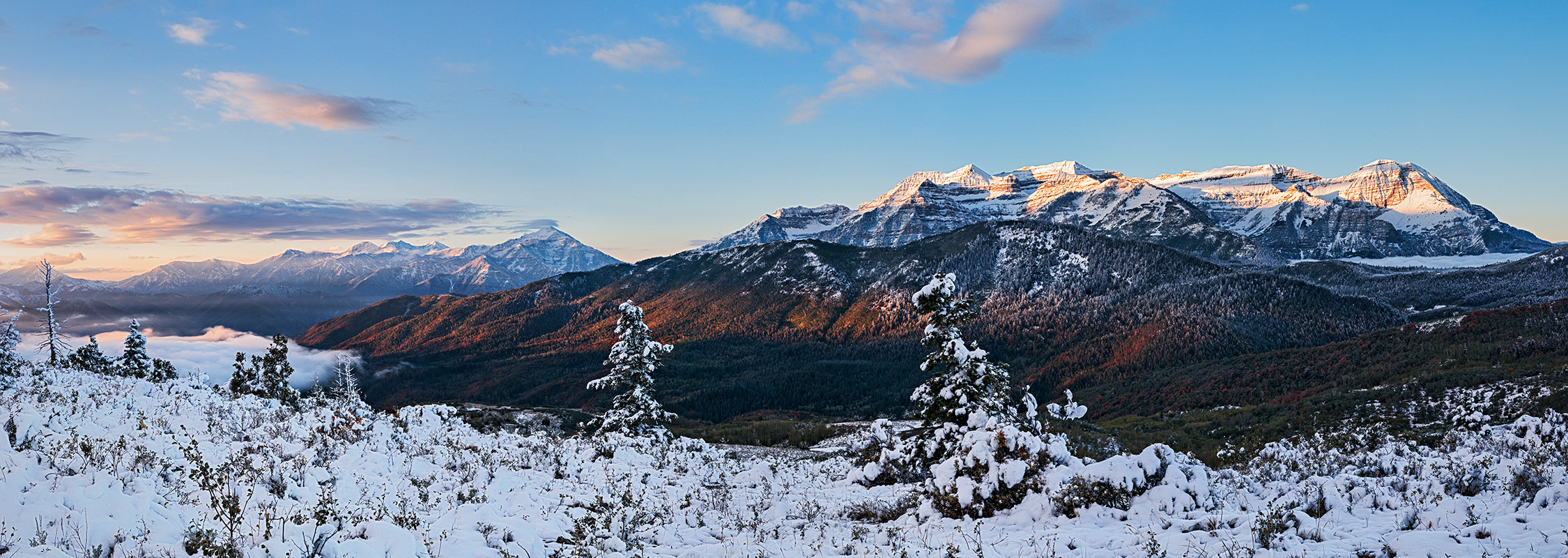
For Jim, here is a complete redo. I found that even though the 3 images were shot at the same settings just seconds apart, the brightness of the sky did vary as in the original. I also found slight differences in WB. I made manual adjustments before stitching and still needed to add a right to left gradient. The final image still has some brightness at the right side horizon which I think is natural because it is much lower elevation.
Anyway I would like to hear if this solves the problem or needs more work.
Anyway I would like to hear if this solves the problem or needs more work.

Kyle Jones
Moderator
I like the pano much more than the individual shot you posted the other day (which was still nice). This is really beautiful. I think the rework was worth the effort, including the fact that you lost the partial tree on the left side.
Thanks Kyle, glad you prefer the rework and the pano over the single.I like the pano much more than the individual shot you posted the other day (which was still nice). This is really beautiful. I think the rework was worth the effort, including the fact that you lost the partial tree on the left side.

Bob Denton
Premium Member
Yes, the rework looks better I think.
Hey Ben,
I like your edit/rework better. The sky looks much nicer.
As to what you noticed about the individual exposures in the pano, while most suggest to shoot panos in Manual, myself I prefer to shoot in Aperture priority, do that the cameras metering changes the exposure for me as I shoot. Because depending on the light, it can change drastically from the left to the right side.
Jim
I like your edit/rework better. The sky looks much nicer.
As to what you noticed about the individual exposures in the pano, while most suggest to shoot panos in Manual, myself I prefer to shoot in Aperture priority, do that the cameras metering changes the exposure for me as I shoot. Because depending on the light, it can change drastically from the left to the right side.
Jim
Pete Van Hamersveld
Well-Known Member
Nice landscape and I like the wide panoramic.