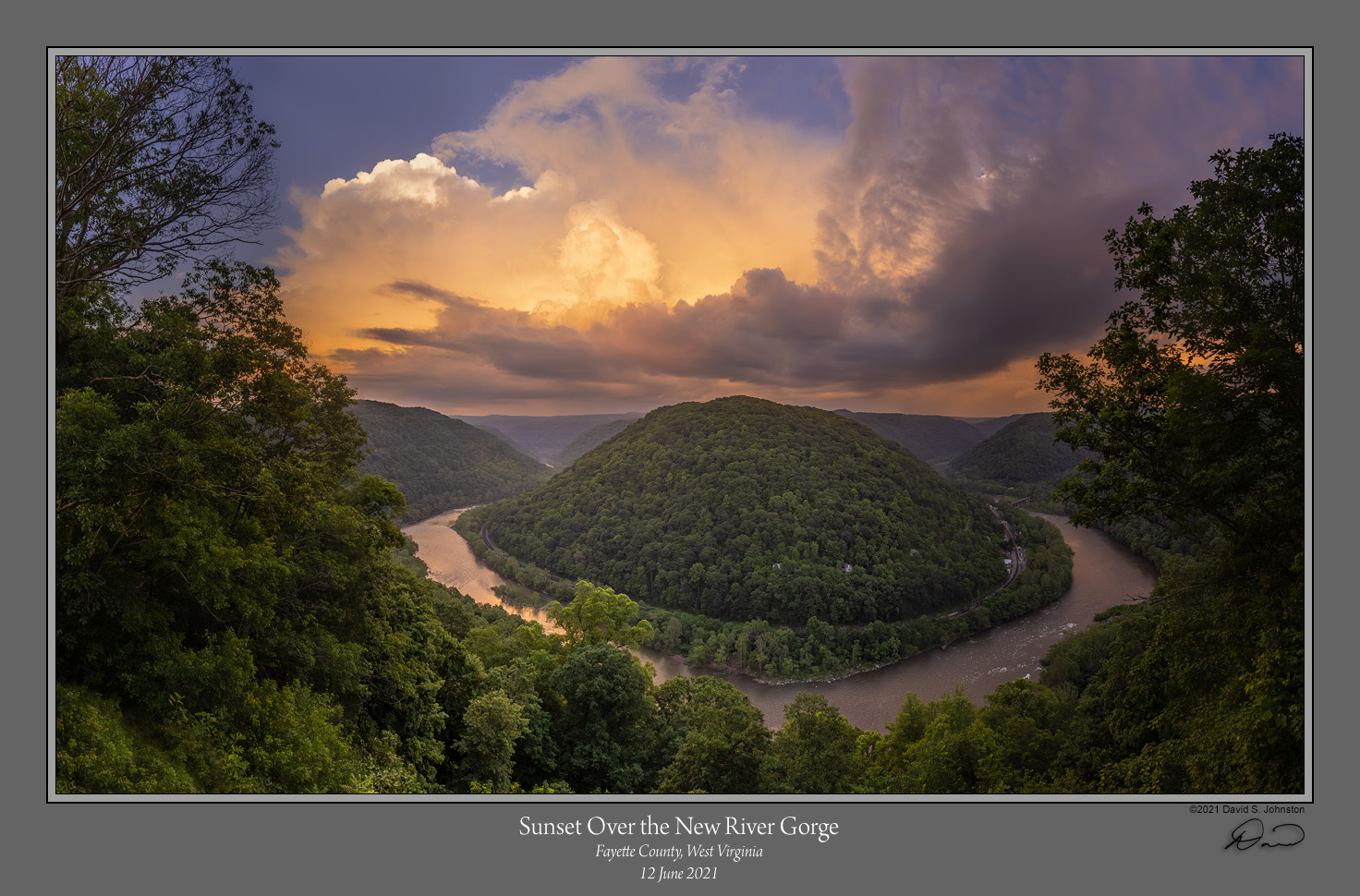
Sunset over the New River Gorge

Dave Johnston

Well-Known Member
This kind of falls in the category of "I didn't deserve this, but I'll take it!"

My girlfriend and I went down to Beckley, WV to drop off pictures for an exhibition we had both been selected for, and were just spending the rest of the day poking round the new River Gorge (our newest National Park, if you hadn't heard). We weren't really planning on doing any serious photography, as it was a sunny day and we weren't feeling ambitious. We decided to go to a overlook that we hadn't been to before, which had recently had trees cleared and a viewing deck constructed. We noticed that there were some storm clouds to the east, and decided to stay and see what happened; maybe catch some lightning. But as sunset approached the clouds ended up bathed in a warm glow. It never got vivid, but it was still pretty rewarding for having put in essentially no effort!

This is looking out over one of many goosenecks in the New River, which is about 800 feet below. The old mining town of Thurmond is to the right. Its main street of building, the depot and a few houses have been preserved by the NPS. Amtrak (and many freight trains) runs through the Gorge and has a stop at Thurmond.
Concho Sunset 1.jpg


Comments and suggestions welcome.

Dave
 

AlanLichty

Moderator
Wonderful result - I wish I could stumble across scenes like this by accident. Very nice light and you processed it well to bring out the depth in the scene.
 

Mike Lewis

Staff Member
Wow! Aside from being a fantastic recruiting poster to go visit this newly minted national park, this is just a fantastic image! Wonderful vista, great depth, engaging composition, and magical light and clouds! One of my favorites from you (and that is saying something based on your excellent previous postings...)

ML
 

JimFox

Moderator
Staff member
This is so awesome Dave! Love the way the cloud is being lit up, and that horseshoe bend in the river is to die for! Awesome!

Ask your girlfriend to join us here if you haven't already! :)
 

Ken Rennie

Well-Known Member
Dave, what a lovely image, caught perfectly. What it will look like with Autumn colors I can only dream about. I am struck by the left side overpowering the right with little reason for my eyes to visit this side, the right hand side is totally needed to complete the "story" of the river. A suggestion may be to slightly darken and very! slightly desaturate the trees at the far bottom left of the image and slightly brighten the trees the trees at the outer riverside as they sweep around the bend, this should lead your eye further round the scene before jumping back to those terrific clouds. The very bright tree sticking up is also grabbing more of my attention. Only a few suggestions and I would be delighted to have produced a shot as good as this. Ken
 

Dave Johnston

Well-Known Member
Thanks so much Alan, Ben, Mike Jim and Ken. Jim, I really appreciate the Featured Photo honor!

@Ken Rennie , you are right, and I intend to do edits similar to what you suggest. I just discovered the reason that some of my recent panoramas have a gradient of lightness that is not in the original scene, or the original captures. Each of the frames is, of course, shot with the same exposure, so the lightness and color of the overlapping, common parts of the scene are essentially the same between frames. In ACR I select all of the images and apply the same adjustments to all them so that (in theory) they remain the same from frame to frame, and will stitch without obvious transitions. But I am finding that ACR does NOT apply the same adjustment in the same way to adjacent frames. For instance, if you apply the Shadows adjustment to two adjacent frames, if one frame has more light elements elsewhere in the frame, it will lighten the shadows more than it will the shadows in the adjacent frame. So the same content that appears in both overlapping frames ends up with a different degree of lightness. I think what happened here is that ACR tended to lighten the shadows of the trees on the hillside more on the left than on the right, since the left has brighter sky.

This behavior in ACR seems to be more pronounced now that I have the CC version of Photoshop/ACR; I never noticed it in 15 years of doing panoramas through CS6. I am not happy about it and may need to explore different raw processors.

Dave
 

Ken Rennie

Well-Known Member
Thanks so much Alan, Ben, Mike Jim and Ken. Jim, I really appreciate the Featured Photo honor!

@Ken Rennie , you are right, and I intend to do edits similar to what you suggest. I just discovered the reason that some of my recent panoramas have a gradient of lightness that is not in the original scene, or the original captures. Each of the frames is, of course, shot with the same exposure, so the lightness and color of the overlapping, common parts of the scene are essentially the same between frames. In ACR I select all of the images and apply the same adjustments to all them so that (in theory) they remain the same from frame to frame, and will stitch without obvious transitions. But I am finding that ACR does NOT apply the same adjustment in the same way to adjacent frames. For instance, if you apply the Shadows adjustment to two adjacent frames, if one frame has more light elements elsewhere in the frame, it will lighten the shadows more than it will the shadows in the adjacent frame. So the same content that appears in both overlapping frames ends up with a different degree of lightness. I think what happened here is that ACR tended to lighten the shadows of the trees on the hillside more on the left than on the right, since the left has brighter sky.

This behavior in ACR seems to be more pronounced now that I have the CC version of Photoshop/ACR; I never noticed it in 15 years of doing panoramas through CS6. I am not happy about it and may need to explore different raw processors.

Dave
One thing that I often forget is leaving the color balance " as shot" chances are the color balance is different between the frames, this is easily fixed. I have not come across the problem outlined. However one possible way round the problem is to produce the panorama with only the color balance fixed and then take the combined layer back into ACR. Have you tried using lightroom to produce your panorama? I know that it doesn't allow some stitching options that photoshop allows but it often produces a pretty good pano. Good luck. Ken
 

Dave Johnston

Well-Known Member
One thing that I often forget is leaving the color balance " as shot" chances are the color balance is different between the frames, this is easily fixed. I have not come across the problem outlined. However one possible way round the problem is to produce the panorama with only the color balance fixed and then take the combined layer back into ACR. Have you tried using lightroom to produce your panorama? I know that it doesn't allow some stitching options that photoshop allows but it often produces a pretty good pano. Good luck. Ken
I shoot with white balance fixed at Daylight, always. This isn't a color balance problem, but rather lightness. I have no trouble with white balance, it stays uniform from frame to frame. Also, I notice that the Exposure slider does not cause this problem -- changing it lightens or darkens the same subject matter in adjacent frames to the same degree, so they stay the same. But the Shadows and Highlight sliders exhibit disparate behavior from frame to frame, so the same subject matter contained in adjacent frames ends up with different lightness values.

I have never used Lightroom for anything; even though I now have it as part of the CC subscription, I have never opened it! But the adjustment engines for both Lightroom and ACR are the same, so I would not expect the behavior to be different. I don't use Photoshop for stitching; I save the images in the panorama as tiffs and use PTGui for stitching. PTGui actually does a yeoman's job compensating for the uneven output from ACR, and blends adjacent frame quite well, so at least the lightness transition is smooth. The problem is with ACR, and its inconsistent application of Shadows and Highlights adjustments.

Dave
 

Ken Rennie

Well-Known Member
I shoot with white balance fixed at Daylight, always. This isn't a color balance problem, but rather lightness. I have no trouble with white balance, it stays uniform from frame to frame. Also, I notice that the Exposure slider does not cause this problem -- changing it lightens or darkens the same subject matter in adjacent frames to the same degree, so they stay the same. But the Shadows and Highlight sliders exhibit disparate behavior from frame to frame, so the same subject matter contained in adjacent frames ends up with different lightness values.

I have never used Lightroom for anything; even though I now have it as part of the CC subscription, I have never opened it! But the adjustment engines for both Lightroom and ACR are the same, so I would not expect the behavior to be different. I don't use Photoshop for stitching; I save the images in the panorama as tiffs and use PTGui for stitching. PTGui actually does a yeoman's job compensating for the uneven output from ACR, and blends adjacent frame quite well, so at least the lightness transition is smooth. The problem is with ACR, and its inconsistent application of Shadows and Highlights adjustments.

Dave
I used to use PtGui but find for 99% of panoramas, photoshop works for me. I know ACR andlightroom use the same engine, however after lightroom has a unified file I would expect that the shadow, highlights etc controls will apply similarly throughout the entire panoramic image. I will have a play. I think that around version 3 or 4 the way that shadows/ highlights worked was changed to make it dynamically react to the surroundings and that looks like what you are describing. Try changing the process back to version 1 or 2 (it is in the Calibration area). Alternatively try and apply shadows etc as a local adjustment. Good luck. Ken
 

Dave Johnston

Well-Known Member
Yes, I would hope that once the frame are stitched together, that ACR or Lightroom would treat them the same throughout the image. But I need to develop the raw images before I can stitch them. And it is in that development process, still working with separate images, that this happens.

Yes, I surmised that the Shadows and Highlight are programmed to dynamically adjust based on the surroundings. I can see value in that for processing individual images. But in this case, for use with panoramas, they are too smart for their own good (or for MY good!). if there were a way to switch this behavior on an off, that would be ideal, but I don't think that is possible.

Dave
 

Ken Rennie

Well-Known Member
OK had a play I produced 2 files
white background.jpg

black background.jpg

and applied the same amount of shadow lifting (+50) to both. As you have already noted the results are very different. The mid grey rectangle in the white version moved from l =54 to L of 79. In the black version the mid grey rectangle moved from 54 to 65.

When I used ACR version 1 ore version 2 the grey rectangle brightened by the same amount. Version 3 onwards the grey rectangle gets lifted a lot more with the dark background. I will need to see if local adjustment behave similarly. So use version 2, you do miss out on a few things however. Ken
 

Ken Rennie

Well-Known Member
Last thing I tried selectively brushing a shadow lift and I am afraid it behaves differently depending on the overall brightness of the entire image not the brightness of the parts of the image around the selective edit. I will need to see if Capture One behaves similarly. I will also need to bear this in mind with my panoramas. Lastly if you make a mistake and produce an image with a different exposure then the exposure slider is definitely not linear. Thank you for pointing this out. Ken
 

Dave Johnston

Well-Known Member
Thanks for your tests, Ken. Even though I understand that they are trying to make it more responsive to the image, that is counterproductive for cases where you specifically need the same content to be treated the same by the same adjustment across multiple images. When you say Version 2 or Version 3, etc., are you referring to the process version on the Calibration tab? I will try that. But I suspect I will need the other abilities of the latest version (Version 5) to optimally process my panos, particularly with respect to shadow lifting. I used to have always blend exposure brackets in order to get good shadows, but the latest process versions are so good at shadows that I often don't need to bracket. I suppose one of the reasons the new processes are so good is that they do this dynamic processing that treats different image differently. So that is both the cure and the disease!

Dave
 

Tom Narwid

Well-Known Member
This kind of falls in the category of "I didn't deserve this, but I'll take it!"

My girlfriend and I went down to Beckley, WV to drop off pictures for an exhibition we had both been selected for, and were just spending the rest of the day poking round the new River Gorge (our newest National Park, if you hadn't heard). We weren't really planning on doing any serious photography, as it was a sunny day and we weren't feeling ambitious. We decided to go to a overlook that we hadn't been to before, which had recently had trees cleared and a viewing deck constructed. We noticed that there were some storm clouds to the east, and decided to stay and see what happened; maybe catch some lightning. But as sunset approached the clouds ended up bathed in a warm glow. It never got vivid, but it was still pretty rewarding for having put in essentially no effort!

This is looking out over one of many goosenecks in the New River, which is about 800 feet below. The old mining town of Thurmond is to the right. Its main street of building, the depot and a few houses have been preserved by the NPS. Amtrak (and many freight trains) runs through the Gorge and has a stop at Thurmond.

View attachment 40658

Comments and suggestions welcome.

Dave
That's a beauty....great sky.
 
Top Bottom